Embed Token Generation
Note: We enhanced a newer approach to token generation using the object model structure. Please refer to this link to learn more.
Below Bold BI v13.2, we used a query string approach to generate a token by calling the token generation endpoint via a GET API call.
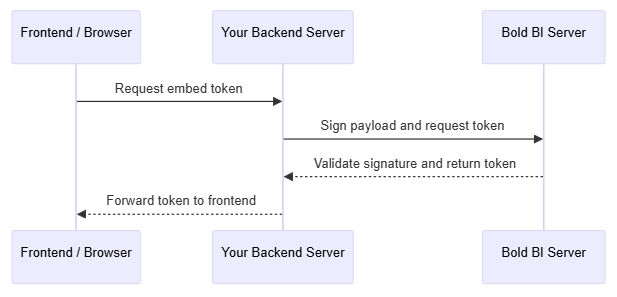
The following diagram illustrates the token generation flow:
- Node.js
- .NET
- PHP
/*
  Example: Embed Token Generation (Node.js)
  Requires: express, crypto, https, http
  Install express: npm install express
*/

const express = require('express');
const crypto = require('crypto');
const https = require('https');
const http = require('http');

const app = express();

app.post('/tokenGeneration', function (req, res) {
  // Required details
  const serverUrl = "<Bold BI Server URL>";
  const siteIdentifier = "<Site Identifier>";
  const serverApiUrl = serverUrl + "/api/" + siteIdentifier;
  const dashboardId = "<Dashboard Id>";
  const userEmail = "<User Email>";
  const embedSecret = "<Embed Secret Key>";

  // Build query string
  let queryString = "embed_nonce=" + crypto.randomUUID();
  queryString += "&embed_dashboard_id=" + dashboardId;
  queryString += "&embed_user_email=" + userEmail;

  // Sign query string
  const embedSignature = "&embed_signature=" + getSignatureUrl(queryString, embedSecret);
  const embedDetailsUrl = "/embed/authorize?" + queryString + embedSignature;

  // Request token from Bold BI server
  const serverProtocol = new URL(serverApiUrl).protocol === 'https:' ? https : http;
  serverProtocol.get(serverApiUrl + embedDetailsUrl, function (resultContent) {
    let str = '';
    resultContent.on('data', chunk => { str += chunk; });
    resultContent.on('end', function () {
      const resultJson = JSON.parse(str);
      if (resultJson?.ApiStatus && resultJson.Data?.access_token) {
        res.json({ access_token: resultJson.Data.access_token });
      } else {
        res.status(500).json({ error: "Failed to generate embed token" });
      }
    });
  });
});

// Helper function: Sign query string using embedSecret
function getSignatureUrl(queryString, embedSecret) {
  const hmac = crypto.createHmac('sha256', Buffer.from(embedSecret));
  return hmac.update(queryString).digest('base64');
}
Note: Here we are generating a token based on the provided user permission and not dashboard embedding specific. This token can be used for all other supported types of embedding. As of now, we have provided the dashboard ID as a mandatory valid property to generate the token. We will remove this dashboard ID mandatory requirement in an upcoming future release.
Note: The supported embeddings are dashboard viewer and dashboard designer.
The following mandatory values must be configured in your backend application to generate an embed token.
| Parameter | Description |
|---|---|
serverUrl |
Base URL of your Bold BI application (e.g.,
https://your-company.boldbi.com/bi).
|
siteIdentifier |
Unique site/tenant identifier in Bold BI (e.g., site/tenant) |
dashboardId |
Unique ID of the dashboard How To get: Open the dashboard in BI application and copy the ID from the browser's URL. |
userEmail |
Email of the user viewing the dashboard. The user must exist in Bold BI and have permission to access it. |
embedSecret |
Secret key used to sign authorization requests. How To get: Retrieve this from the Bold BI settings page. |
Important: Never expose
embedSecretto the client. Generate tokens only on your backend and returnaccess_tokento the browser.