
Configure Window Expressions in Bold BI
A window expression (or window function) is a special type of SQL (or BI tool) expression that performs calculations across a set of rows related to the current row, without collapsing them into a single output row.
Unlike aggregate functions, which return a single value for a group of rows, window functions return a value for each row within the defined window or partition.
Types of Window Expressions
- SUM()
- AVG()
- MIN()
- MAX()
- COUNT()
- ROW_NUMBER()
- RANK()
- DENSE_RANK()
- NTILE(n)
- FIRST_VALUE()
- LAST_VALUE()
Syntax of a Window Function
WindowExpression([Column], PartitionBy := [GroupColumn], OrderBy := [SortColumn], Frame := FrameType)
Explanation of Parameters
| Parameter | Description |
|---|---|
| Column | The column on which the calculation is performed. This parameter is required only when the window function operates on a column (for example, SUM, AVG, MAX, etc.). It is optional for functions that do not require a specific column, such as RANK(), DENSE_RANK(), or ROW_NUMBER(). |
| PartitionBy | Defines how the data is divided into groups or partitions. Calculations are performed separately within each partition. Multiple dimension columns can be passed by separating them with commas. Example: PartitionBy := [Dimension1], [Dimension2] |
| OrderBy | Determines the order of rows within each partition. This parameter is required for functions such as ROW_NUMBER(), RANK(), DENSE_RANK(), FIRST_VALUE(), and LAST_VALUE(). Multiple dimension columns can also be specified using commas. Example: OrderBy := [Dimension1], [Dimension2] |
| Frame |
Supported frame types include: 1. Running – Includes all rows from the start of the group up to the current row. 2. RowsTrailing(n) – Includes the current row and the previous n rows. 3. DaysTrailing(n) - Includes the current row and rows from the past n days. 4. EntirePartition - Includes all rows in the group (partition). Example: Notes: It’s only suitable for aggregation-related window expressions such as SUM, COUNT, AVG, MIN, MAX, FIRST_VALUE, and LAST_VALUE.
Specifies the subset of rows used for the calculation. |
Sample Data
| OrderID | Region | SalesRep | OrderDate | Product | Quantity | Amount |
|---|---|---|---|---|---|---|
| 101 | "East" | "Alice" | "2025-01-01" | "Laptop" | 2 | 2000.00 |
| 102 | "East" | "Bob" | "2025-01-03" | "Monitor" | 1 | 250.00 |
| 103 | "East" | "Alice" | "2025-01-05" | "Mouse" | 5 | 100.00 |
| 104 | "West" | "Charlie" | "2025-01-02" | "Laptop" | 1 | 1000.00 |
| 106 | "East" | "Bob" | "2025-01-06" | "Laptop" | 1 | 1000.00 |
| 107 | "West" | "Charlie" | "2025-01-07" | "Mouse" | 10 | 200.00 |
| 108 | "East" | "Alice" | "2025-01-08" | "Monitor" | 2 | 500.00 |
| 109 | "East" | "Alice" | "2025-01-09" | "Laptop" | 3 | 3000.00 |
| 110 | "West" | "Bob" | "2025-01-10" | "Monitor" | 2 | 500.00 |
Window Functions
COUNTPARTITON
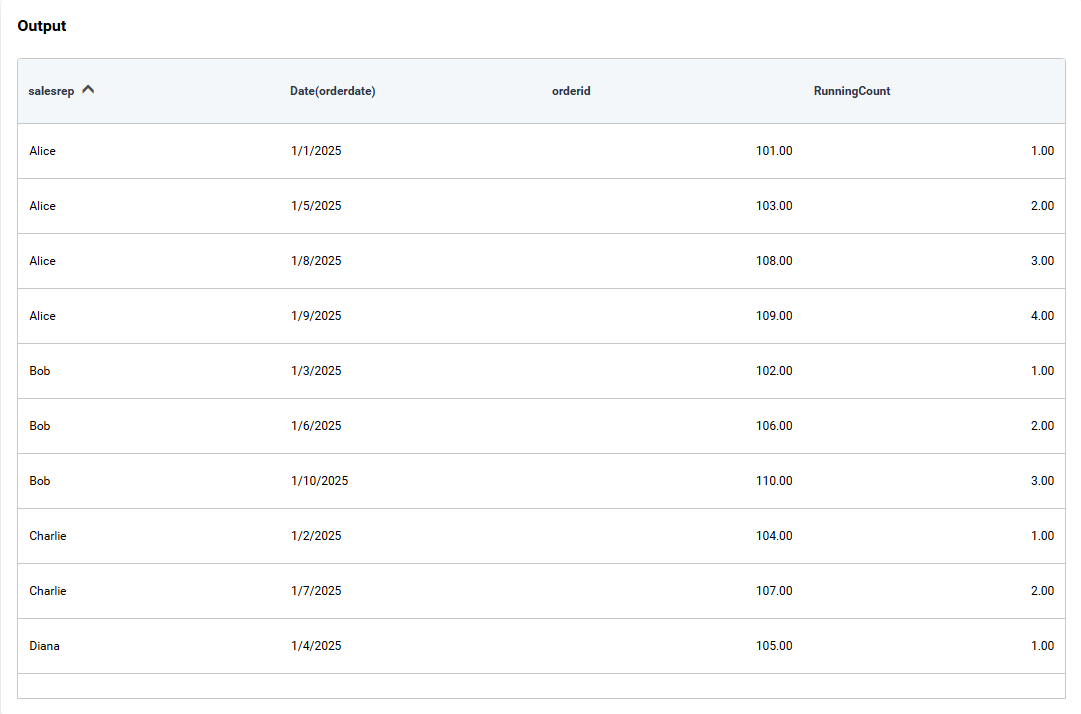
The COUNTPARTITION() window expression calculates a running count of a specified column across rows within a defined partition, while maintaining each row in the output.
Syntax
COUNTPARTITION([Column], PartitionBy := [GroupColumn], OrderBy := [SortColumn], Frame := FrameType)
Example
Displays the count of OrderID values, partitioned by SalesRep and ordered by OrderDate, with a running frame applied.
COUNTPARTITION([OrderID], PartitionBy := [SalesRep], OrderBy := [OrderDate], Frame := Running)
SUMPARTITON
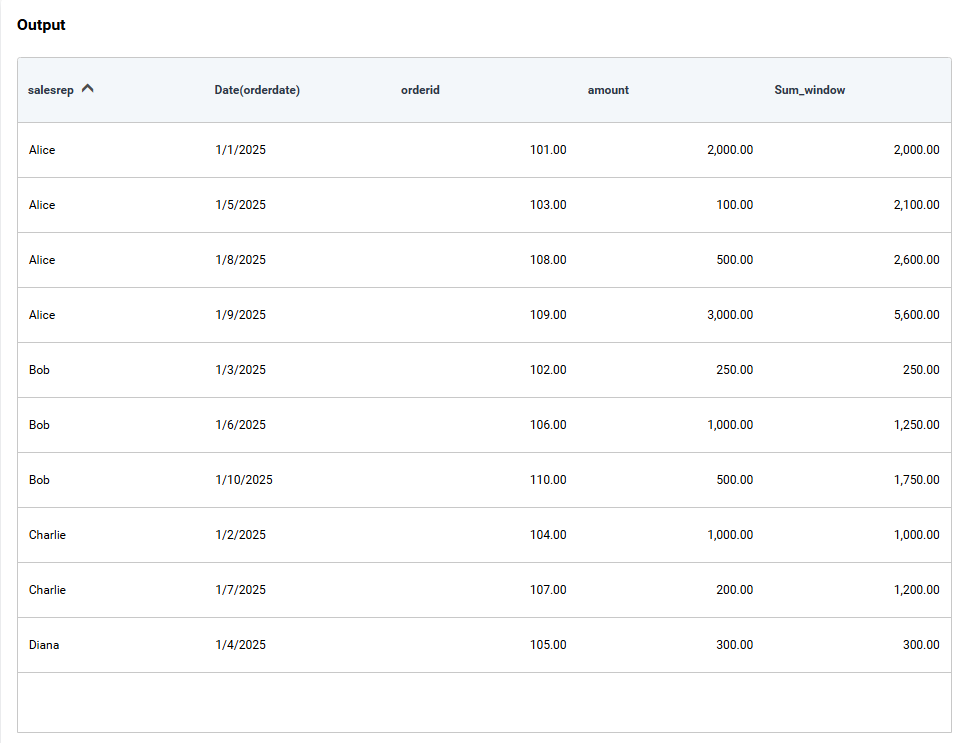
The SUMPARTITION() window expression calculates a running total of a specified column across rows within a defined partition, while maintaining each row in the output.
Syntax
SUMPARTITION([Column], PartitionBy := [GroupColumn], OrderBy := [SortColumn], Frame := FrameType)
Example
Displays the sum of Amount partitioned by SalesRep, ordered by OrderDate, with a running frame.
SUMPARTITION([amount], PartitionBy := [salesrep], OrderBy := [orderdate], Frame := Running)
AVGPARTITON
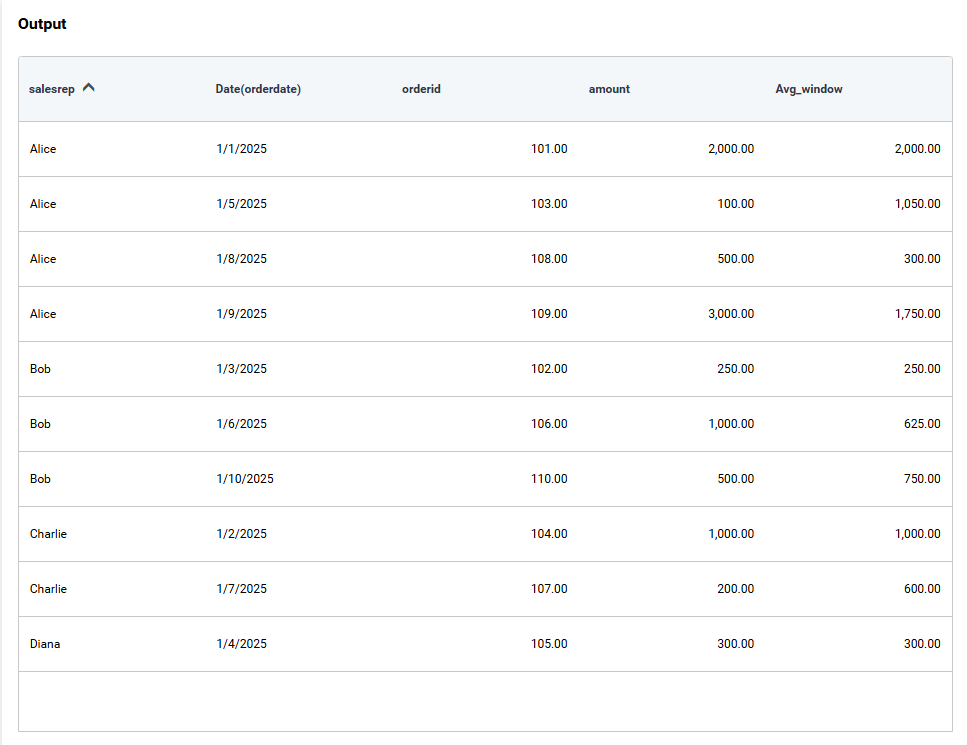
The AVGPARTITION() window expression calculates a running average of a specified column across rows within a defined partition.
Syntax
AVGPARTITION([Column], PartitionBy := [GroupColumn], OrderBy := [SortColumn], Frame := FrameType)
Example
Displays the average of Amount for each SalesRep, ordered by OrderDate, with a frame that includes the current row and the previous row (ROWS Trailing 1).
AVGPARTITION([amount], PartitionBy := [salesrep], OrderBy := [orderdate], Frame := RowsTrailing(1))
MINPARTITON
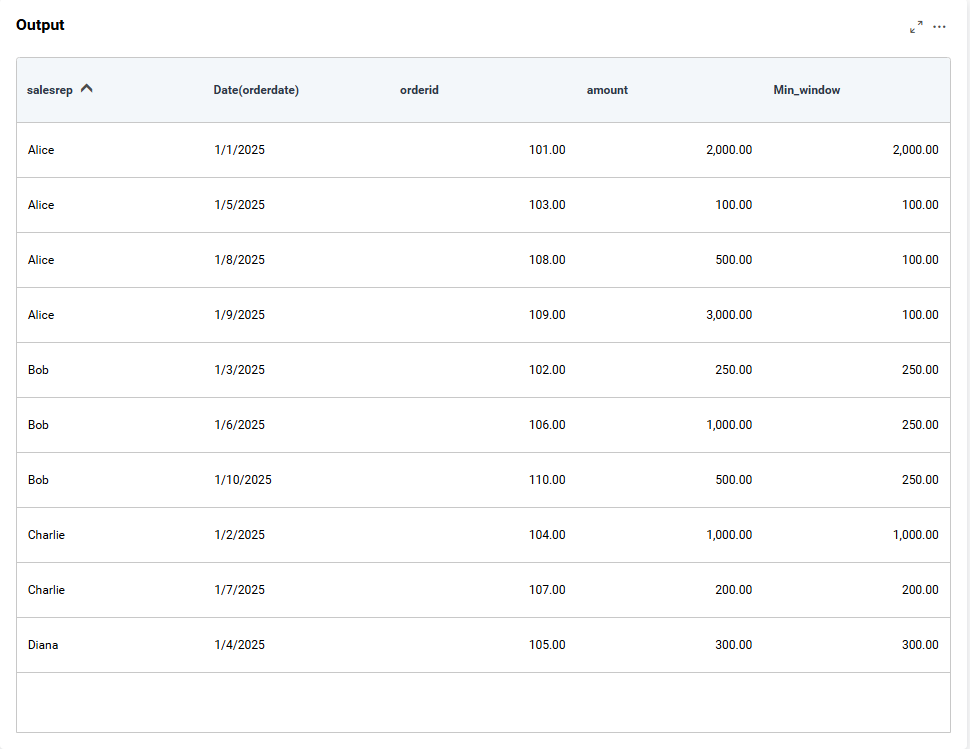
The MINPARTITION() window expression returns the minimum value of a column within the current frame of a partition.
Syntax
MINPARTITION([Column], PartitionBy := [GroupColumn], OrderBy := [SortColumn], Frame := FrameType)
Example
Displays the Min of Amount for each SalesRep, ordered by OrderDate, with a running frame
MINPARTITION([amount], PartitionBy := [salesrep], OrderBy := [orderdate], Frame := Running)
MAXPARTITON
The MAXPARTITION() window expression returns the maximum value of a column within the current frame of a partition.
Syntax
MAXPARTITION([Column], PartitionBy := [GroupColumn], OrderBy := [SortColumn], Frame := FrameType)
Example
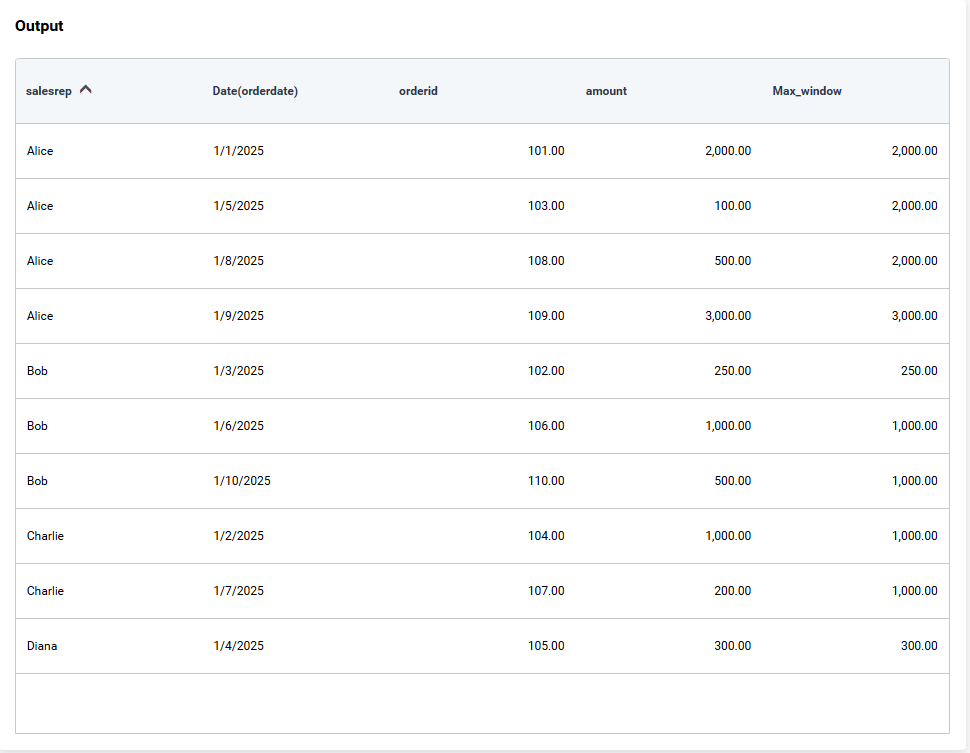
Displays the Max of Amount for each SalesRep, ordered by OrderDate, with a running frame
MAXPARTITION([amount], PartitionBy := [salesrep], OrderBy := [orderdate], Frame := Running)
ROW_NUMBER
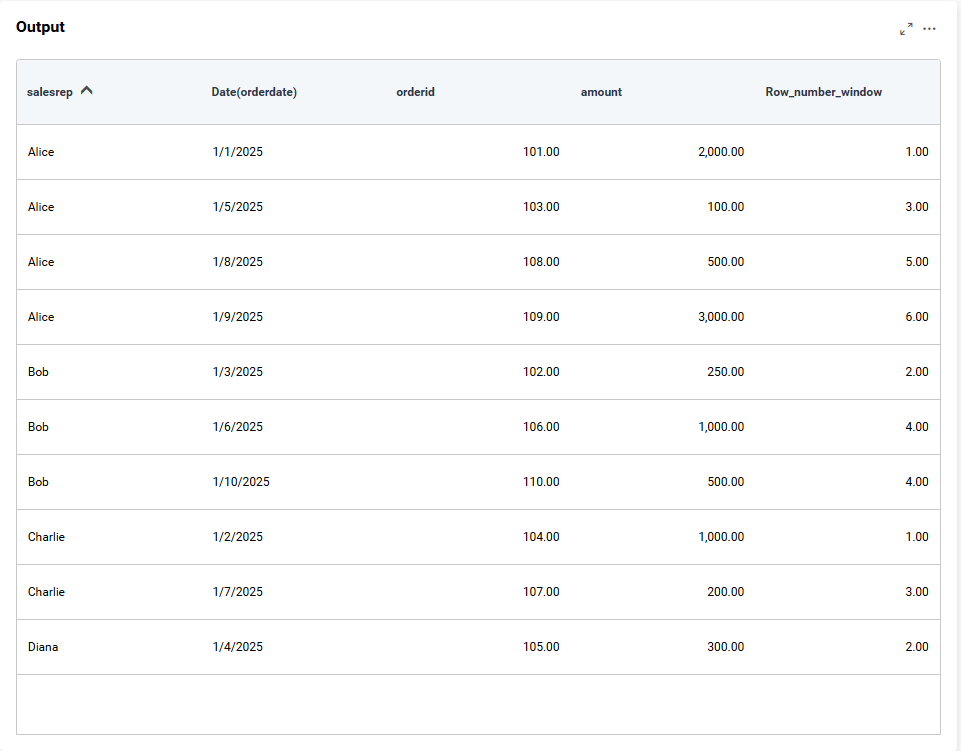
The ROWNUMBER() window expression assigns a unique sequential number to each row within a partition based on the order specified.
Syntax
ROWNUMBER(PartitionBy := [GroupColumn], OrderBy := [SortColumn])
Example
Assigns a row number to each order within its region, sorted by OrderDate.
ROW_NUMBER(PartitionBy := [region], OrderBy := [orderdate])
RANK
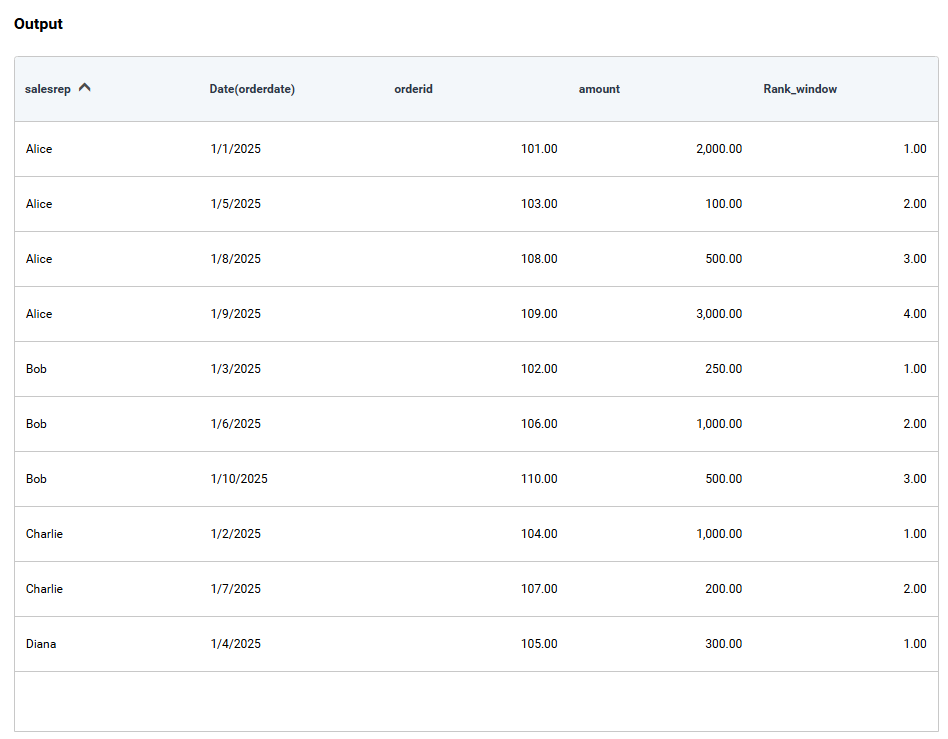
The RANK() window expression assigns a rank to each row within a partition based on the order specified.
Syntax
RANK(PartitionBy := [GroupColumn], OrderBy := [SortColumn])
Example
Displays the rank for each SalesRep, ordered by OrderDate.
RANK(PartitionBy := [salesrep], OrderBy := [orderdate])
DENSE_RANK
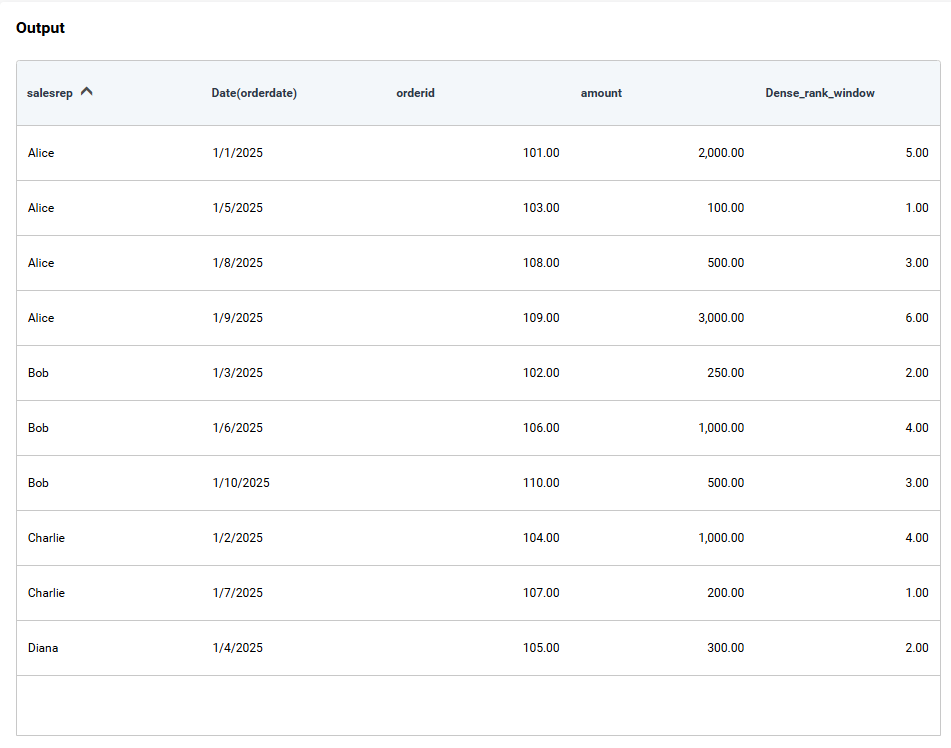
The DENSE_RANK() window expression is similar to RANK but does not leave gaps for ties.
Syntax
DENSERANK(PartitionBy := [GroupColumn], OrderBy := [SortColumn])
Example
Displays the Orders are ranked by amount within each region. If two orders tie, they share the same rank, but the next rank is consecutive (e.g., 1, 2, 2, 3).
RANK(PartitionBy := [region], OrderBy := [amount])
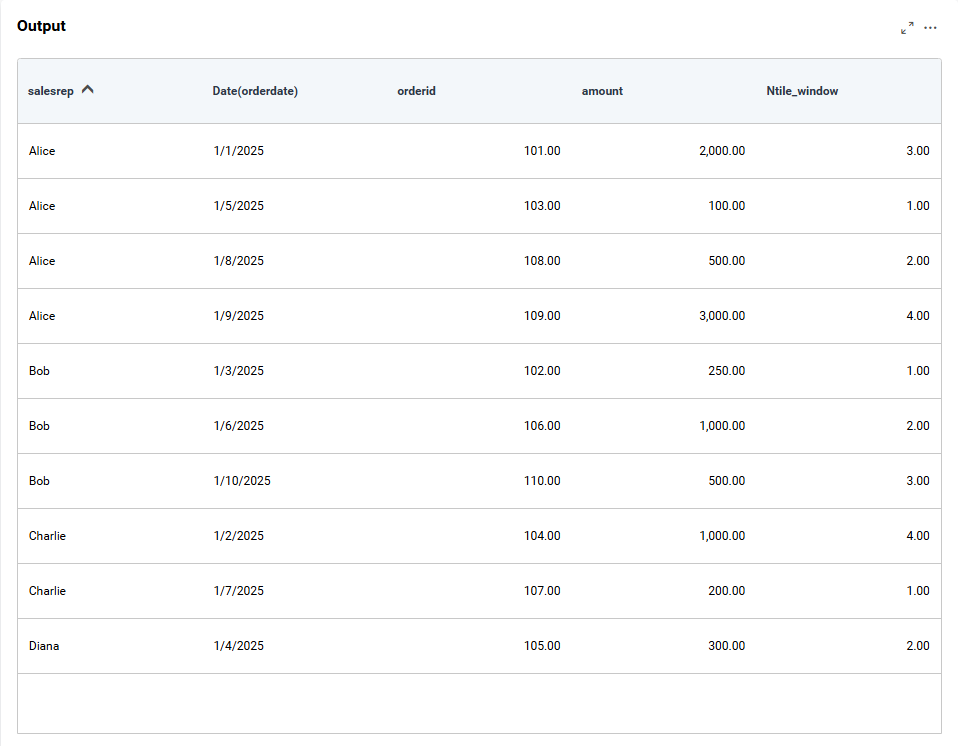
NTILE(n)
The NTILE(n) window expression is divides rows into n buckets within a partition.
Syntax
NTILE(n, PartitionBy := [GroupColumn], OrderBy := [SortColumn])
Example
Displays the Orders within each region are divided into 4 groups based on amount. Each row is assigned a bucket number from 1 to 4.
NTILE(4, PartitionBy := [region], OrderBy := [amount])
FIRST_VALUE
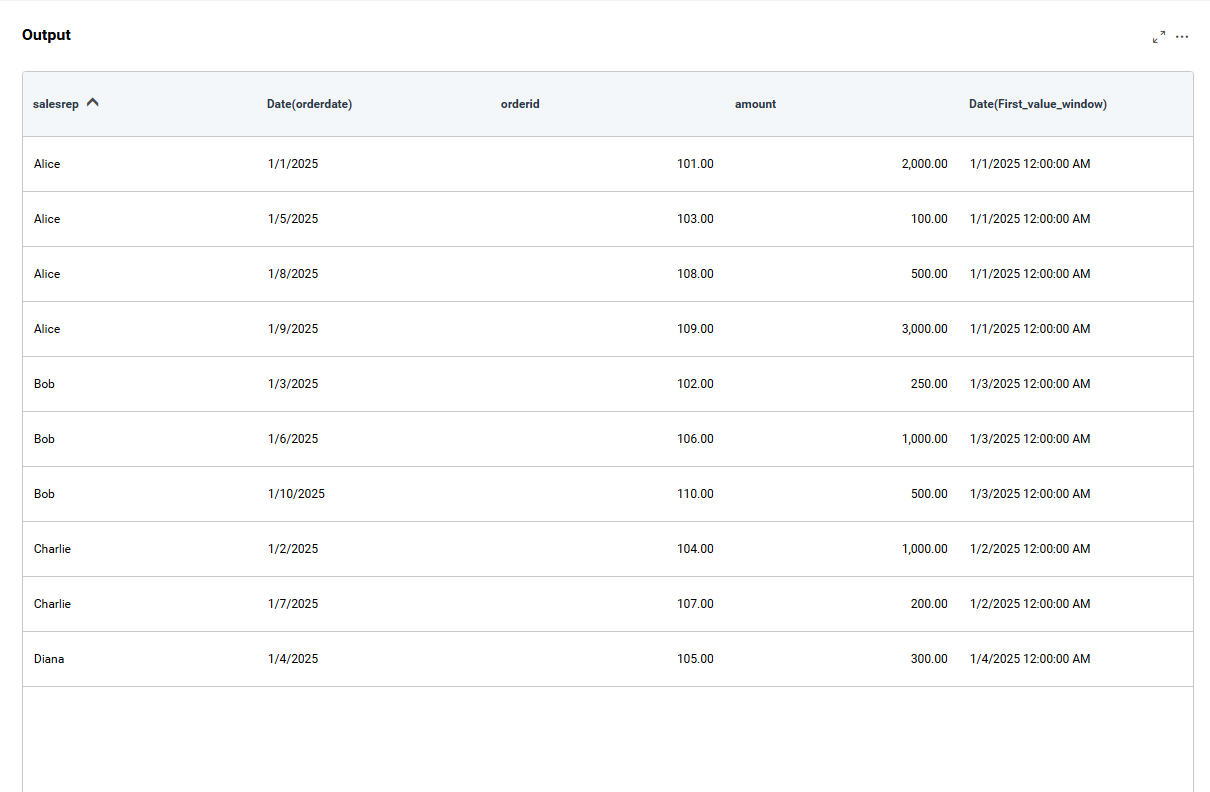
The FIRST_VALUE() window expression returns the first value in an ordered partition.
Syntax
FIRSTVALUE([Column], PartitionBy := [GroupColumn], OrderBy := [SortColumn])
Example
For each salesrep, this returns the earliest OrderDate in the partition.
FIRSTVALUE([orderdate], PartitionBy := [salesrep], OrderBy := [orderdate])
LAST_VALUE
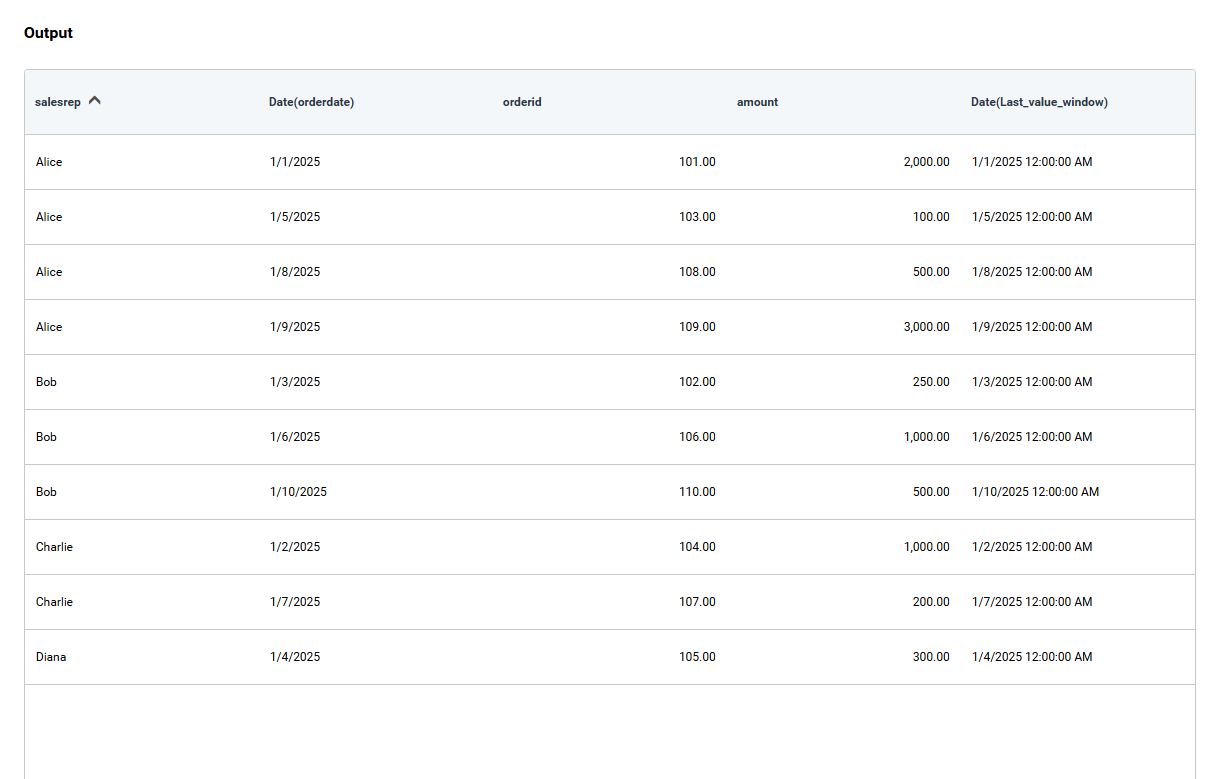
The LAST_VALUE() window expression returns the last value in an ordered partition.
Syntax
LASTVALUE([Column], PartitionBy := [GroupColumn], OrderBy := [SortColumn])
Example
For each salesrep, this returns the latest OrderDate in the partition.
LASTVALUE([orderdate], PartitionBy := [salesrep], OrderBy := [orderdate])
Inline Expressions for Window Expressions
Window expressions support using either an existing expression field or an inline expression directly as the value argument for the following functions:
COUNTPARTITION()SUMPARTITION()AVGPARTITION()MINPARTITION()MAXPARTITION()FIRSTVALUE()LASTVALUE()
Using an Inline Expression
Instead of creating a separate expression, you can directly use an inline expression as the value argument:
FIRSTVALUE(CONCAT([SalesRep], [Region]), PartitionBy := [Region], OrderBy := [OrderDate])Using an Existing Expression
First, create an expression:
Expression1 = CONCAT([SalesRep], [Region])Then reference the expression in a window function:
FIRSTVALUE(Expression1, PartitionBy := [Region], OrderBy := [OrderDate])Limitations
-
Window expressions are not supported in raw data views, such as Data Preview, View Underlying Data, or Grid Raw Data.
-
Aggregations such as COUNT or AVG cannot be used directly inside a window expression.
Example:
COUNT([Ordered]) COUNTPARTITION([Expression1], PartitionBy := [SalesRep], OrderBy := [OrderDate], Frame := Running)
-
Window expressions can return multiple values based on partition columns.
-
Window expressions cannot be used within other expressions, such as nested expressions.
-
Window expressions do not work with aggregation fields (such as COUNT, SUM, etc.) alone; at least one dimension must be included along with the aggregation expression.
-
Window expressions are not supported in widgets with Row or Column category types, because they return multiple values that cannot fit into a single row, column, or certain widget value types.
-
Window functions can be used in the aggregation category, but they are not supported in the Value field together with aggregation, and window expressions in columns are not supported in Bar or Column charts.
-
For complex query scenarios, Bold BI recommends using aggregation tables, view tables, or Code View instead of window expressions.
-
Window expression could not use in Filter due to windows expression only used in SELECT and Order BY only.
-
Do not use the DaysTrailing() frame type in SQL Intermediate or SQL Live Connector, as it is not natively supported in SQL Server.
NOTE: For complex query scenarios, Bold BI recommends using aggregation tables, view tables, or Code View instead of window expressions.