
Audit Logs
Audit Logs track all changes to AI Assistant settings and skills. This provides a complete history of who made changes, when they were made, and what was changed.
Accessing Audit Logs
- Navigate to AI Assistant → Settings → Audit logs.
- Click Audit logs in the left sidebar under OPERATIONS.
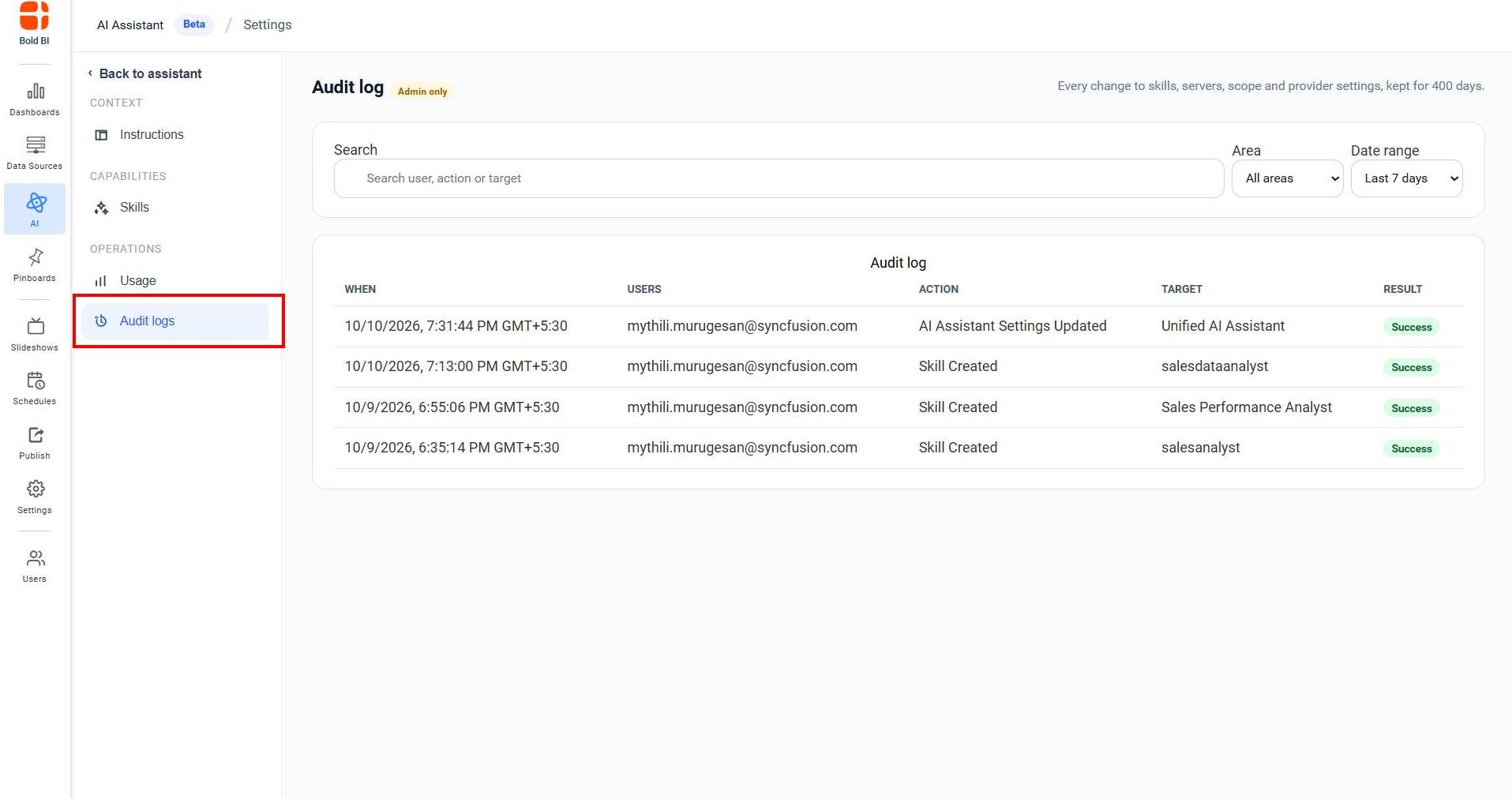
Note: Only administrators can access audit logs.
What is Tracked
Audit logs record changes to:
- Skills (creation, editing, deletion, enable, disable)
- Global Instructions (creation, modification, deletion)
Audit Log Information
Each log entry shows:
- WHEN - Date and time of the change
- USERS - Administrator email who made the change
- ACTION - What was done (Skill Created, Settings Updated, etc.)
- TARGET - What was affected (skill name, instructions, etc.)
- RESULT - Whether it succeeded or failed
Searching Audit Logs
-
Use the Search box to find specific changes by entering:
- User email
- Action type
- Target resource name
-
Use Date range to filter by time period:
- Last 7 days (default)
- Other options available
-
Use Area dropdown to filter by category:
- Skill
- MCP server
- AI provider
- Assistant settings
- Agent
- Permission
- Other areas