
Configure Time Intelligence Expressions in Bold BI
Time intelligence expressions compare a measure with an earlier calendar period. The PREVIOUSPERIOD function returns the value of an aggregate for a period that is a given number of months before the period of each widget row.
Use PREVIOUSPERIOD to:
- Compare this month’s sales with last month’s sales.
- Calculate the change from the previous month, quarter, or year.
- Calculate a three-month average of earlier months.
- Calculate each group’s share of the previous month’s total.
PREVIOUSPERIOD is listed under the Time Intelligence category in the Expression Designer.
PREVIOUSPERIOD syntax
PREVIOUSPERIOD(<aggregate>([Measure]), [DateColumn], 'MONTH', <offset> [, 'ROW' | 'TABLE'])Example: PREVIOUSPERIOD(SUM([Amount]), [OrderDate], 'MONTH', 1)Parameters
| Parameter | Description |
|---|---|
| Aggregate | One aggregate function applied to one column of the data source. Supported functions are SUM, AVG, MIN, MAX, COUNT, and COUNTD. SUM and AVG need a numeric column.Example: SUM([Amount]) |
| DateColumn | A date column of the data source. The same column must be added to the widget. Example: [OrderDate] |
| Unit | The period unit. Only 'MONTH' is supported. Use multiples of months for quarters and years. |
| Offset | The number of months to go back, as a whole number from 1 to 36. Examples: 1 is the previous month, 3 is the previous quarter, and 12 is the previous year. |
| Scope (optional) | 'ROW' (default) returns the earlier period for the same values of the other widget columns. 'TABLE' returns the earlier period for all rows together. For more information, see Calculation scope. |
Supported data sources
PREVIOUSPERIOD is supported for live connections to the following data sources:
Data sources that use joined tables are supported. For other data sources, the Time Intelligence category is not listed in the Expression Designer.
Add a PREVIOUSPERIOD expression
- Open the data source and click
Expressionin the toolbar of the data design view. For more information, see Adding an expression column. - Click
Addand enter a name, for examplePrevious Month Amount. - Enter the expression, for example
PREVIOUSPERIOD(SUM([Amount]), [OrderDate], 'MONTH', 1). You can also selectPREVIOUSPERIODfrom the Time Intelligence category. - Click
Save. Bold BI validates the expression and shows a message when an argument is not valid. For the messages, see Troubleshooting.
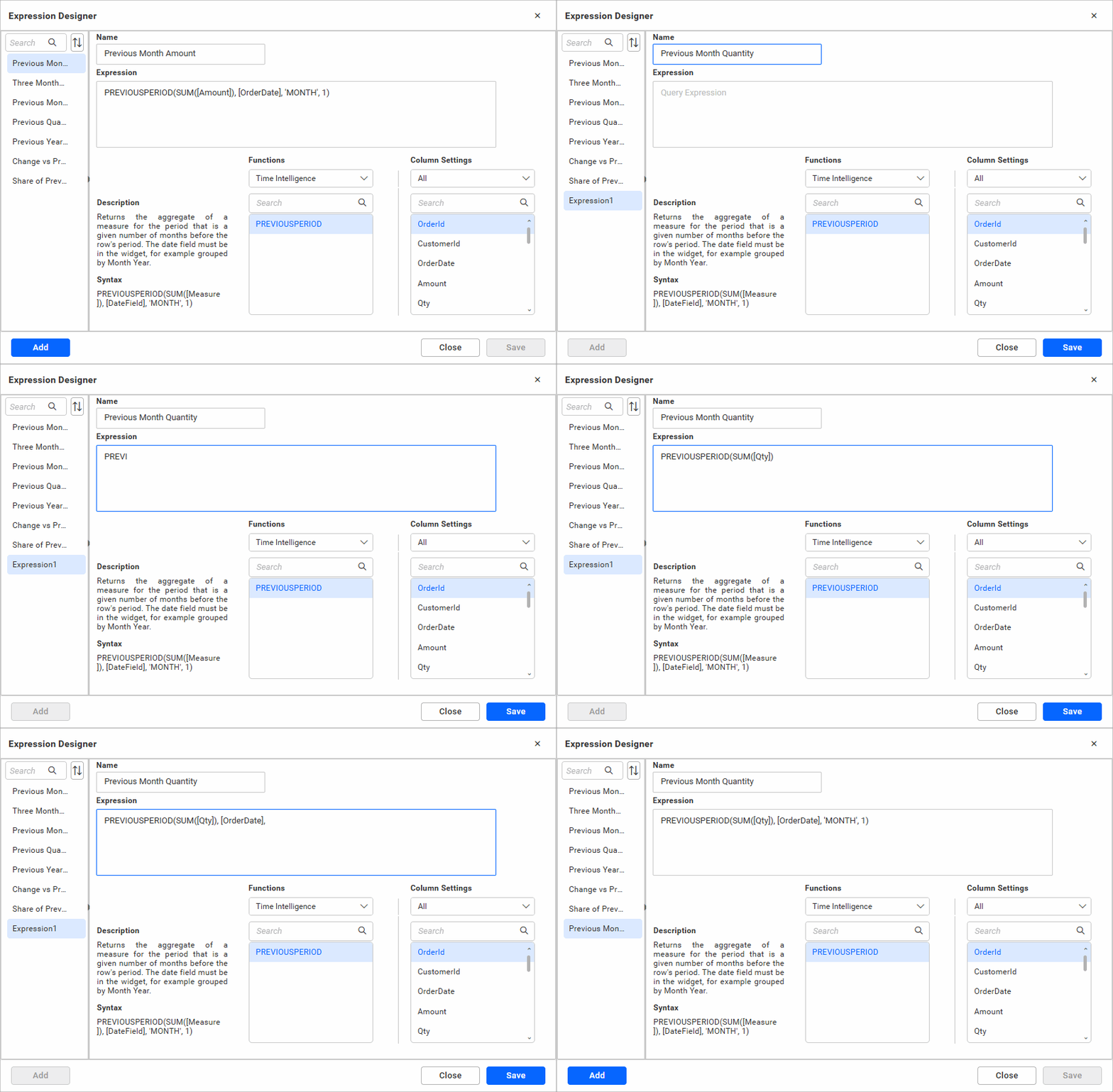
When you select PREVIOUSPERIOD in the Time Intelligence category, the Expression Designer shows its description and syntax.
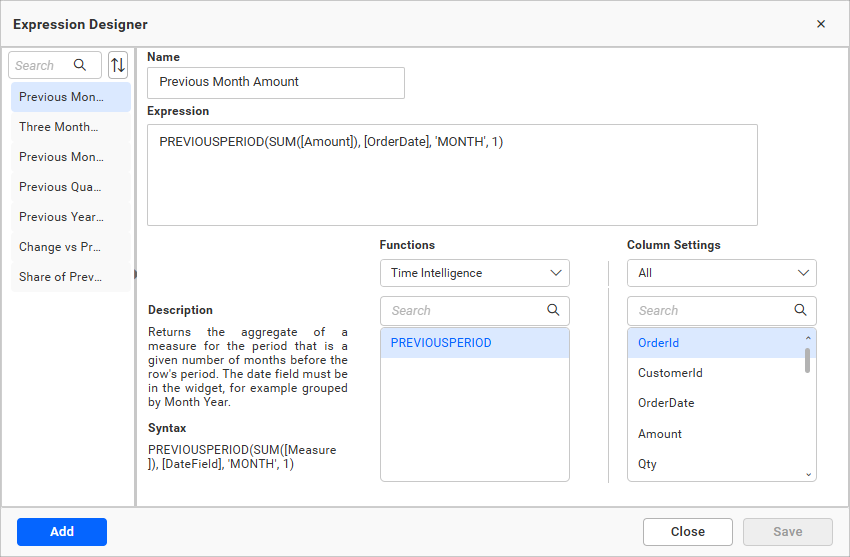
You can use a saved PREVIOUSPERIOD expression inside other expressions, for example with COALESCE, IF, or arithmetic operators.
Change vs Previous Month = SUM([Amount]) - COALESCE([Previous Month Amount], 0)Use the expression in a widget
Add the expression to a widget together with the date column used in the expression. The date grouping of that column decides the period of each row.
| Date grouping in the widget | Previous period | Offset |
|---|---|---|
| Month Year | The month offset months earlier |
1 to 36 |
| Date, Day Month Year, Month Day Year, Date Time | The whole month offset months before the row’s month |
1 to 36 |
| Year and Month in separate columns | The month offset months earlier |
1 to 36 |
| Quarter Year, or Year and Quarter | The quarter offset / 3 quarters earlier |
3, 6, 9 … 36 |
| Year | The year offset / 12 years earlier |
12, 24, 36 |
| Month only or Quarter only (years combined) | Each month of the row looks back on its own | 1 to 36 for Month, 3, 6, 9 … 36 for Quarter |
Week, day of month, day of week, and time of day groupings are not supported.
NOTE: Use the Month Year grouping for month-over-month comparisons. When a row covers one day, the expression returns the total of the whole earlier month.
Calculation scope: ROW and TABLE
The scope decides which rows are added up for the earlier period when the widget contains columns other than the date.
'ROW'(default): the earlier period for the same values of the other widget columns, for example the same region.'TABLE': the earlier period for all rows together, ignoring every widget column except the date.
The following expressions use a sample orders data source with the Region, OrderDate, and Amount columns:
Previous Month Amount       = PREVIOUSPERIOD(SUM([Amount]), [OrderDate], 'MONTH', 1)
Previous Month Total Amount = PREVIOUSPERIOD(SUM([Amount]), [OrderDate], 'MONTH', 1, 'TABLE')
Share of Previous Month     = [Previous Month Amount] / [Previous Month Total Amount]
A grid with OrderDate (Month Year) and Region shows the following values for January to March 2024:
| Order Month | Region | Sum of Amount | Previous Month Amount | Previous Month Total Amount | Share of Previous Month |
|---|---|---|---|---|---|
| Jan 2024 | East | 646 | (Null) | (Null) | (Null) |
| Jan 2024 | West | 1,446 | (Null) | (Null) | (Null) |
| Feb 2024 | East | 686 | 646 | 2,092 | 0.3088 |
| Feb 2024 | West | 1,486 | 1,446 | 2,092 | 0.6912 |
| Mar 2024 | East | 726 | 686 | 2,172 | 0.3158 |
| Mar 2024 | West | 1,526 | 1,486 | 2,172 | 0.6842 |
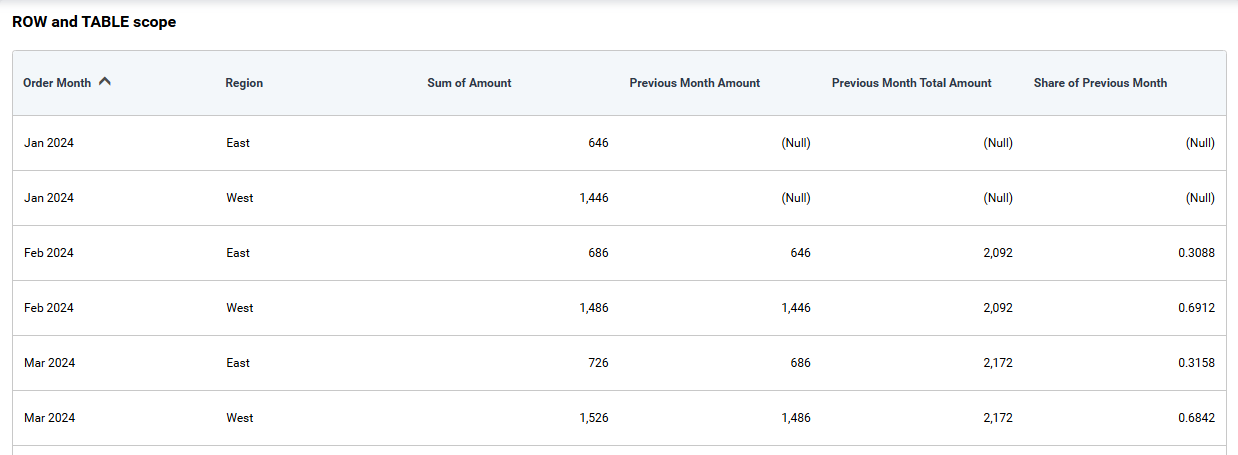
For February 2024, Previous Month Amount is each region’s January amount. Previous Month Total Amount is 2,092 for both regions, which is the January amount of all regions (646 + 1,446). The two shares add up to 1.
When the widget shows only the date column, 'ROW' and 'TABLE' return the same value.
Examples
The examples use the same sample orders data source. The monthly amount of all regions is 2,092 in January 2024, 2,172 in February 2024, 2,252 in March 2024, and 2,332 in April 2024.
Compare with the previous month
Previous Month Amount   = PREVIOUSPERIOD(SUM([Amount]), [OrderDate], 'MONTH', 1)
Three Months Ago Amount = PREVIOUSPERIOD(SUM([Amount]), [OrderDate], 'MONTH', 3)
A grid with OrderDate (Month Year) shows the following values for January to April 2024:
| Order Month | Sum of Amount | Previous Month Amount | Three Months Ago Amount |
|---|---|---|---|
| Jan 2024 | 2,092 | (Null) | (Null) |
| Feb 2024 | 2,172 | 2,092 | (Null) |
| Mar 2024 | 2,252 | 2,172 | (Null) |
| Apr 2024 | 2,332 | 2,252 | 2,092 |
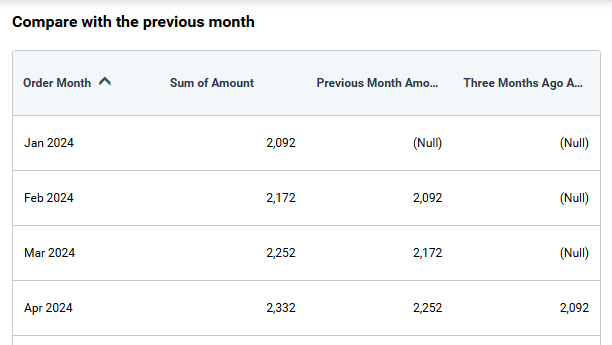
The sample data starts in January 2024, so the earlier periods of the first months are empty.
Calculate the change from the previous month
Change vs Previous Month = SUM([Amount]) - COALESCE([Previous Month Amount], 0)A grid with Region filtered to East and OrderDate (Month Year) shows the following values for January to March 2024:
| Region | Order Month | Sum of Amount | Previous Month Amount | Change vs Previous Month |
|---|---|---|---|---|
| East | Jan 2024 | 646 | (Null) | 646 |
| East | Feb 2024 | 686 | 646 | 40 |
| East | Mar 2024 | 726 | 686 | 40 |
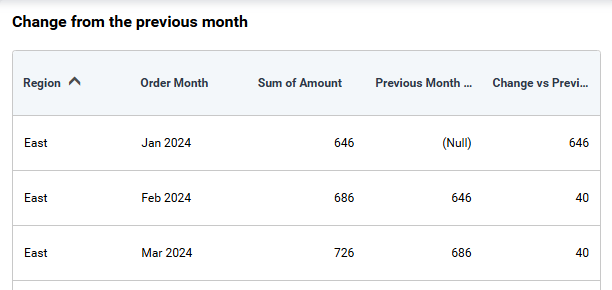
COALESCE turns the empty previous month of January 2024 into 0, so the change is shown instead of an empty value.
Compare with the previous quarter
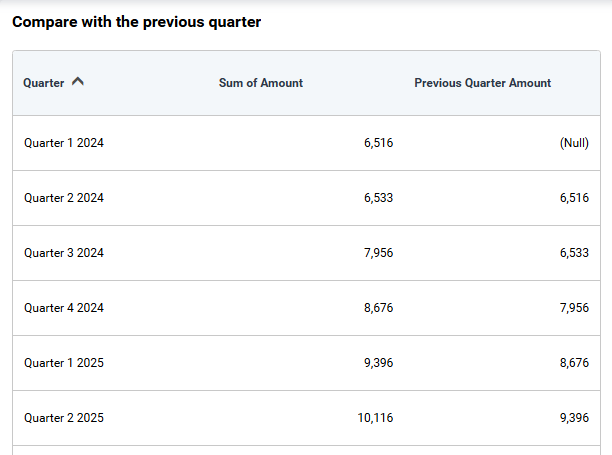
Group OrderDate by Quarter Year and use an offset of 3:
Previous Quarter Amount = PREVIOUSPERIOD(SUM([Amount]), [OrderDate], 'MONTH', 3)| Quarter | Sum of Amount | Previous Quarter Amount |
|---|---|---|
| Quarter 1 2024 | 6,516 | (Null) |
| Quarter 2 2024 | 6,533 | 6,516 |
| Quarter 3 2024 | 7,956 | 6,533 |
| Quarter 4 2024 | 8,676 | 7,956 |
| Quarter 1 2025 | 9,396 | 8,676 |
| Quarter 2 2025 | 10,116 | 9,396 |
Compare with the previous year
Group OrderDate by Year and use an offset of 12:
Previous Year Amount = PREVIOUSPERIOD(SUM([Amount]), [OrderDate], 'MONTH', 12)| Year | Sum of Amount | Previous Year Amount |
|---|---|---|
| 2024 | 29,681 | (Null) |
| 2025 | 19,512 | 29,681 |
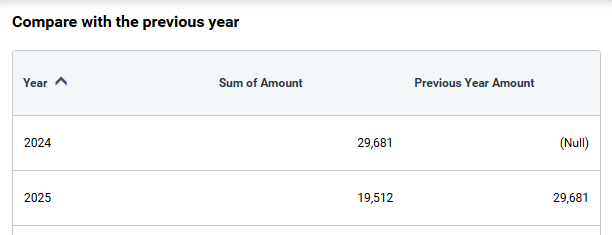
The sample data for 2025 covers January to June, so Sum of Amount for 2025 is a partial year. Previous Year Amount is the total of the whole year 2024.
Filters
Dashboard filters, widget filters, user filters, and URL filters apply to the earlier periods in the same way as to the current period. This applies to both scopes.
For example, with a filter Region = East, Previous Month Total Amount ('TABLE') for February 2024 is 646, the January amount of the East region only. Without the filter, it is 2,092, the January amount of all regions.
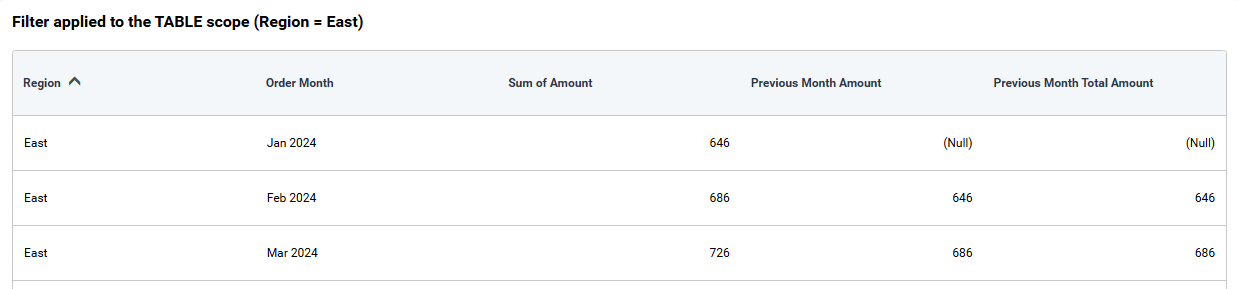
A filter on the date column used in the expression only limits the periods that the widget shows. Earlier periods outside the filter are still used. For example, a widget filtered to March 2025 still shows the February 2025 amount as Previous Month Amount.
Missing earlier periods
When an earlier period has no data, PREVIOUSPERIOD returns an empty value (Null). Any calculation with an empty value also returns an empty value, for example [Previous Month Amount] + 100.
Wrap each PREVIOUSPERIOD expression in COALESCE to treat a missing period as 0:
Three Month Average = (COALESCE([Previous Month Amount], 0) + COALESCE([Two Months Ago Amount], 0) + COALESCE([Three Months Ago Amount], 0)) / 3COALESCE([Previous Month Amount] + [Two Months Ago Amount] + [Three Months Ago Amount], 0) / 3 returns 0 when any one of the three months is missing, because the sum is empty before COALESCE is applied.
Limitations
- Only the
'MONTH'unit is supported, with an offset from 1 to 36. Use 3 for a quarter and 12 for a year. - The widget must contain the date column used in the expression. A widget without it, such as a number card, shows an error.
- All
PREVIOUSPERIODexpressions in one widget must use the same date column. - Only calendar periods are supported. Fiscal year groupings are not supported.
- The first argument must be one aggregate of a data source column. Another expression cannot be used inside
PREVIOUSPERIOD, andPREVIOUSPERIODcannot be nested. PREVIOUSPERIODcannot be combined withTOTAL,TOTALPERCENTAGE, running functions,PREVIOUSVALUE,NEXTVALUE, level of detail functions (FIXED,INCLUDE,EXCLUDE), window functions,MEDIAN,MODE, orPERCENTILE_CONTin the same expression. A widget that usesPREVIOUSPERIODcannot also contain level of detail, window, orMEDIANexpressions.- With the default
'ROW'scope, every other dimension column in the widget is matched with the earlier period. Add numeric columns as measures, such asSum of Amount. A dimension column whose value changes every period, such as a month label column, returns an empty previous value. 'TABLE'scope ignores all widget columns except the date. It cannot keep some columns and ignore others.- Data sources with data relationships, combined data sources, custom SQL queries that start with a
WITHclause, and stored procedures are not supported. Use joined tables instead of data relationships. - The grid summary row adds up the values shown in the rows. It does not recalculate ratios or averages for the whole period.
- Sorting a widget by a
PREVIOUSPERIODexpression column is not supported. Sort by the date column or by another measure. - In view mode, an expression error shows a general error message. Open the dashboard in the designer to see the detailed message.
Troubleshooting
| Message | Solution |
|---|---|
| PREVIOUSPERIOD needs an aggregate, a date field, a unit and an offset … | Enter all four arguments, for example PREVIOUSPERIOD(SUM([Sales]), [OrderDate], 'MONTH', 1). |
| The first argument of PREVIOUSPERIOD must be one aggregate over one field, such as SUM([Sales]). | Use one of SUM, AVG, MIN, MAX, COUNT, or COUNTD on one column. |
| PREVIOUSPERIOD: [column] is not a column of this data source. Use a table column, not another expression. | Check the column name. Do not use another expression inside PREVIOUSPERIOD. |
| PREVIOUSPERIOD: SUM needs a numeric column, but [column] is not numeric. | Use a numeric column with SUM and AVG. |
| The second argument of PREVIOUSPERIOD must be a date field, such as [OrderDate]. | Enter a date column in square brackets. |
| The unit of PREVIOUSPERIOD must be ‘MONTH’. | Enter 'MONTH' as the third argument. |
| The offset of PREVIOUSPERIOD must be a whole number from 1 to 36. | Enter a whole number from 1 to 36. |
| The scope of PREVIOUSPERIOD must be ‘ROW’ or ‘TABLE’. | Enter 'ROW' or 'TABLE', or leave out the fifth argument. |
| PREVIOUSPERIOD cannot be nested. | Create the inner calculation as a separate expression. |
| PREVIOUSPERIOD cannot be combined with … in the same expression. | Create the other calculation in a separate expression and widget. |
| PREVIOUSPERIOD cannot be used in the same widget as LOD or window expressions. | Move the level of detail or window expression to another widget. |
| PREVIOUSPERIOD cannot be used in the same widget as MEDIAN. | Move the MEDIAN expression to another widget. |
| Add [column] to the widget grouped by Year, Quarter, Quarter Year, Month, Month Year or Date to use PREVIOUSPERIOD. | Add the date column to the widget with a supported grouping. |
| PREVIOUSPERIOD: [column] is grouped by Quarter in this widget, so the number of months must be a multiple of 3 … | Use 3, 6, 9, and so on for quarters, and 12, 24, or 36 for years. |
| All PREVIOUSPERIOD expressions in one widget must use the same date field. | Use one date column for all PREVIOUSPERIOD expressions in the widget. |
| PREVIOUSPERIOD supports calendar periods only; fiscal Month Year, Quarter and Year are not supported. | Change the date grouping to a calendar period. |
| PREVIOUSPERIOD is not supported for combined data sources, WITH queries or stored procedures. | Use a data source with tables or joined tables. |
| PREVIOUSPERIOD is not supported for this data source. | Use a SQL Server, PostgreSQL, or Amazon Redshift live data source. |
| A PREVIOUSPERIOD expression in this widget could not be resolved. Open the expression and save it again. | Open the expression in the Expression Designer and save it again. |
| The previous-period value is (Null) for every row. | Check whether the widget contains a dimension column whose value changes every period. Remove it, or add numeric columns as measures. |