
Members
dashboardId
string
Defines the ID of the dashboard to be embedded from your Bold BI application.
- Required: Yes
- Default:
""(empty)
Example
var dashboard = BoldBI.create({
     mode: BoldBI.Mode.Design,
     dashboardId: "5cb065f7-dabb-4b0c-9b45-c60a5730e963"
});
dashboard.loadDesigner();
dashboardPath
string
Stores the dashboard path in the format of category name followed by dashboard name.
- Syntax:
/{category-name}/{dashboard-name} - Default:
""(empty)
Example
var dashboard = BoldBI.create({
     mode: BoldBI.Mode.Design,
     dashboardPath: "/Samples/Sample Dashboard"
});
dashboard.loadDesigner();
embedContainerId
string
The ID of a div element in which the dashboard will be initialized and rendered.
- Required: Yes
- Default:
""(empty)
Example
<div id="container"></div>
<script>
     // Embed Dashboard
     var dashboard = BoldBI.create({
          mode: BoldBI.Mode.Design,
          embedContainerId: "container",
     });
     dashboard.loadDesigner();
</script>
embedToken
string
This property is used to pass the access token generated by the Embed Authorization Server, helping reduce redundant API calls and improve performance. Supported from version 12.1—ensure you’re using the compatible SDK and build. You can either provide the token directly or configure an authorization server. If the server is configured, setting the token manually is not required. A sample implementation is available to demonstrate how the API works.
- Required: No
- Default:
""(empty) - Note: Supported from v12.1. Use the corresponding SDK and build version. Additionally we have created sample to explain how this api works
Example
var dashboard = BoldBI.create({
     mode: BoldBI.Mode.Design,
     embedToken:  "eyJhbGciOiJIUzI1NiIsInR5cCI6IkpXVCJ9.eyJlbWFpbCI6ImRldm9wc0Bib2xkYmkuY29tIiwidXBuIjouYm9sZGJpZGVtby5jb20vYmkvc2l0ZS9zaXRlMSIsImF1ZCI6Imh0dHBzOi8vaG90Zml4LXdpbmRvd3MuYm9sZGJpZGVtby5jb20vYmkvc2l0ZS9zaXRlMSJ9.JzbqVr6Brv1mAEvnbHnE-FuShos",
});
dashboard.loadDesigner();
environment
object
Specifies the type of Bold BI application, either Cloud or Enterprise edition.
- Possible Values:
BoldBI.Environment.CloudBoldBI.Environment.Enterprise
- Default:
BoldBI.Environment.Enterprise
Example
var dashboard = BoldBI.create({
     mode: BoldBI.Mode.Design,
     environment: BoldBI.Environment.Enterprise,
});
dashboard.loadDesigner();
expirationTime
number
Specifies the access token expiration time of the dashboard in seconds.
- Required: No
- Default:
86400(24 hours)
Example
var dashboard = BoldBI.create({
     mode: BoldBI.Mode.Design,
     expirationTime:100000,
});
dashboard.loadDesigner();
height
string
Defines the height of the embedding module in percentages or pixels.
- Optional: Yes
- Default: Inherits from the parent container
Example
var dashboard = BoldBI.create({
     mode: BoldBI.Mode.Design,
     height:"800px", //The dashboard is now rendered with a height of 800px
});
dashboard.loadDesigner();
mode
object
Defines the dashboard rendering mode.
- Possible Values:
BoldBI.Mode.ViewBoldBI.Mode.DesignBoldBI.Mode.ConnectionBoldBI.Mode.DataSourceBoldBI.Mode.AIAssistant
- Default:
BoldBI.Mode.View
Example
var dashboard = BoldBI.create({
     mode: BoldBI.Mode.Design,
});
dashboard.loadDesigner();
serverUrl
string
The URL of the Bold BI application.
- Required: Yes
- Default:
""(empty)
Example
var dashboard = BoldBI.create({
     serverUrl: "https://mydashboard.com/bi/site/site1",
});
dashboard.loadDesigner();
token
string
Authenticates the dashboard without implementing the Authorization server endpoint. Required only if the Authorization url API is not configured. Refer to the token generation documentation for details.
- Default:
""(empty)
Example
var dashboard = BoldBI.create({
     token: "NjQ2ZDgwZjgtN2Q3MS00ZDQwLWFkNTItYTdkNDRhOGE2NmVi", // Use the generated API key
});
dashboard.loadDesigner();
To learn about the available limited supporting methods in embedding.
width
string
Defines the width of the embedding module in percentages or pixels.
- Optional: Yes
- Default: Inherits from the parent container
Example
var dashboard = BoldBI.create({
     width:"1200px", //The dashboard is now rendered with a width of 1200px.
});
dashboard.loadDesigner();
authorizationServer
url
string
Any application that embeds a Bold BI dashboard and widget needs to authenticate with the Bold BI server. This authentication flow requires sending confidential information such as user email, group details, and embed signature to the Bold BI server. Therefore, you must implement this authentication flow in your server application and provide the URL for connecting to your server in the Bold BI embed instance. Refer to the authorization server documentation for details.
- Required: Yes (If token or embedToken APIs are not used)
- Default:
""(empty)
Example
var dashboard = BoldBI.create({
     authorizationServer: {
          url:"https://serversample.com/embed-details/get",
     }
});
dashboard.loadDashboard();
headers
object
Transmits custom data or header values to the embedding application’s Authorization Server. As a result, you may find this value in the headers of the Authorization Server API.
- Optional: Yes
- Default:
{}(empty object) - Note: Please refer to the Knowledge Base article to know more.
Example
var dashboard = BoldBI.create({
     authorizationServer:{
          headers: {
               "Cookie": "Set-Cookie: sessionId=38afes7a8",
          }
     }
});
dashboard.loadDashboard();
settings
azureMapRequired
boolean
Specifies whether Azure Map-related files need to be downloaded.
- Default:
false - Note: Set to
trueif the dashboard designer contains a Azure Map widget.
Example
var dashboard = BoldBI.create({
    mode: BoldBI.Mode.Design,
    settings: {
        azureMapRequired: false
    }
});
dashboard.loadDesigner();
bingMapRequired
boolean
Specifies whether Bing Map-related files need to be downloaded.
- Default:
false - Note: Set to
trueif the dashboard contains a Bing Map widget.
Example
var dashboard = BoldBI.create({
    mode: BoldBI.Mode.Design,
    settings: {
        bingMapRequired: false
    }
});
dashboard.loadDesigner();
datasources
array
Specifies the value to add multiple data sources to the designer page, allowing customization of data source properties.
- Options:
canEdit: Specifies whether to show or hide the edit icon in the data source.canDelete: Specifies whether to show or hide the delete icon in the data source.
Example
var dashboard = BoldBI.create({
    mode: BoldBI.Mode.Design,
    settings: {
        datasources: [
            {"id": "348e414b-c8c6-4542-839a-2e12934fe64f", "canEdit": true, "canDelete": false},
            {"id": "d9a28bba-e6dd-46c9-89d7-810ebb4796b3", "canEdit": false, "canDelete": true}
        ]
    }
});
dashboard.loadDesigner();
disableAutoRecover
boolean
Specifies whether to show or hide the Auto Recover Popup in the Dashboard Designer.
- Default:
false
Example
var dashboard = BoldBI.create({
    mode: BoldBI.Mode.Design,
    settings: {
        disableAutoRecover: false
    }
});
dashboard.loadDesigner();
aiAssistant
Note: Please use the SDK and Bold BI server from the same version. Starting from version 13.1, the AI Assistant settings are restructured.
enabled
boolean
Enables the AI Assistant for generating and modifying widgets using natural language queries. The AI Assistant enhances widget creation and customization by leveraging advanced AI models, making data visualization more intuitive and accessible. This feature is available in both Cloud and Enterprise editions for Dashboard Viewer, and Dashboard Designer embeddings.
- Default:
false - Note: Ensure the SDK and Bold BI server versions match. Refer to here for more details.
Example
var dashboard = BoldBI.create({
    mode: BoldBI.Mode.Design,
    settings: {
        aiAssistant: {
            enabled: true
        }
    }
});
dashboard.loadDesigner();
helpLink
boolean
Specifies whether to show or hide the AI Chat Help icon in the AI Assistant window. Requires the aiassistantenabled to be set.
- Default:
false
From version 14.1 and later Example
var dashboard = BoldBI.create({
    mode: BoldBI.Mode.AIAssistant,
    settings: {
        aiAssistant:{
            enabled: true,
            hideIcons: {
                helpLink: true
            }
        }
    }
});
dashboard.loadAIAssistant();
Before version 14.1 (v13.2 and earlier)
Example
var dashboard = BoldBI.create({
    settings: {
        aiAssistant: {
            enabled: true,
            hideChatHelp: true
        }
    }
});
dashboard.loadDashboard();
usageAnalytics
boolean
Specifies whether to show or hide the AI Data Usage icon in the AI Assistant window. Requires the aiassistantenabled to be set.
- Default:
false
From version 14.1 and later Example
var dashboard = BoldBI.create({
    mode: BoldBI.Mode.AIAssistant,
    settings: {
        aiAssistant:{
            enabled: true,
            hideIcons: {
                usageAnalytics: true
            }
        }
    }
});
dashboard.loadAIAssistant();
Before version 14.1 (v13.2 and earlier)
Example
var dashboard = BoldBI.create({
    settings: {
        aiAssistant: {
            enabled: true,
            hideUsageAnalytics: true
        }
    }
});
dashboard.loadDashboard();
name
string
Customizes the title of the AI Assistant as desired. Requires the enabled member API.
- Default:
""(empty)
Example
var dashboard = BoldBI.create({
    mode: BoldBI.Mode.Design,
    settings: {
        aiAssistant: {
          enabled: true,
          name: "Embedded AI"
        }
    }
});
dashboard.loadDesigner();
userName
string
Customizes the username of the AI Assistant as desired. Requires the enabled member API.
- Default:
""(empty)
Example
var dashboard = BoldBI.create({
    mode: BoldBI.Mode.Design,
    settings: {
        aiAssistant: {
          enabled: true,
          userName: "Embedded AI user"
        }
    }
});
dashboard.loadDesigner();
summary.enabled
boolean
Specifies whether to show or hide the dashboard and widget summary option. Requires the enabled member API only when using Bold BI version up to v14.1.11.
- Default:
false
var dashboard = BoldBI.create({
    mode: BoldBI.Mode.Design,
    settings: {
        aiAssistant: {
            enabled: true, // Required only when using Bold BI version up to v14.1.11
            summary: {
               enabled: true
            }
        }
    }
});
dashboard.loadDesigner();
summary.dashboard
boolean
Specifies whether to show or hide the AI Dashboard Summary option in the dashboard banner. Requires aiassistantenabled only when using Bold BI version up to v14.1.11 and summaryenabled member APIs.
- Default:
false - Note: Supported only in versions prior to 13.1. From 13.1 onwards, use
settings.aiAssistant.summary.dashboard.
Default value
Example
var dashboard = BoldBI.create({
    mode: BoldBI.Mode.Design,
    settings: {
        aiAssistant: {
            enabled: true, // Required only when using Bold BI version up to v14.1.11
            summary: {
               enabled: true,
               dashboard: true
            }
        }
    }
});
dashboard.loadDesigner();
summary.widget
boolean
Specifies whether to show or hide the AI Widget Summary option in the widgets. Requires aiassistantenabled only when using Bold BI version up to v14.1.11 and summaryenabled member APIs.
- Default:
false - Note: Supported only in versions prior to 13.1. From 13.1 onwards, use
settings.aiAssistant.summary.widget.
Example
var dashboard = BoldBI.create({
    mode: BoldBI.Mode.Design,
    settings: {
        aiAssistant: {
            enabled: true, // Required only when using Bold BI version up to v14.1.11
            summary: {
               enabled: true,
               widget: true
            }
        }
    }
});
dashboard.loadDesigner();
brand
hideHelpLink
boolean
The hideHelpLink option allows you to show or hide the “Know More” option in the scrollable dashboard feature within Dashboard Designer and in the AI Assistant chat window.
Default value
Example
var dashboard = BoldBI.create({
    mode: BoldBI.Mode.Design,
    settings: {
        brand: {
            hideHelpLink: true
        }
    }
});
dashboard.loadDesigner();
domain
string
The domain option allows you to define a link to your custom domain help documentation application instead of using our Bold BI help documentation link in the help icon of the “Know More” option in the scrollable dashboard feature within Dashboard Designer and in the AI Assistant chat window.
Default value : empty
Example
var dashboard = BoldBI.create({
    mode: BoldBI.Mode.Design,
    settings: {
        brand: {
            domain: "https://yourdomain.com"
        }
     }
});
dashboard.loadDesigner();
name
string
The name option allows you to customize the name in the AI Assistant chat window.
Default value : empty
Example
var dashboard = BoldBI.create({
    mode: BoldBI.Mode.Design,
    settings: {
        brand: {
            name: "Demo"
        }
     }
});
dashboard.loadDesigner();
customErrorMessage
customMessage
string
The customErrorMessage option allows you to display a custom message along with the dashboard’s error message. This can be used to provide users with additional context, guidance, or troubleshooting information when an error occurs.
- Default value:
empty
Example
var dashboard = BoldBI.create({
    settings: {
        customErrorMessage: {
            customMessage: "Contact Support Team"
        }
    }
});
dashboard.loadDashboard();
designCanvas
margin
integer
Customize the margins of the dashboard using the corresponding integer values.
- Default:
null
Example
var dashboard = BoldBI.create({
    mode: BoldBI.Mode.Design,
    settings: {
        designCanvas: {
          margin: 30
        }
    }
});
dashboard.loadDesigner();
export
csv
boolean
Specifies whether to show or hide the CSV export option in designer preview option.
- Default:
true
Example
var dashboard = BoldBI.create({
    mode: BoldBI.Mode.Design,
    settings: {
        export: {
            csv: true
        }
    }
});
dashboard.loadDesigner();
excel
boolean
Specifies whether to show or hide the Excel export option in designer preview option.
- Default:
true
Example
var dashboard = BoldBI.create({
    mode: BoldBI.Mode.Design,
    settings: {
        export: {
            excel: true
        }
    }
});
dashboard.loadDesigner();
image
boolean
Specifies whether to show or hide the Image export option in designer preview option.
- Default:
true
Example
var dashboard = BoldBI.create({
    mode: BoldBI.Mode.Design,
    settings: {
        export: {
            image: true
        }
    }
});
dashboard.loadDesigner(); boolean
Specifies whether to show or hide the PDF export option in designer preview option.
- Default:
true
Example
var dashboard = BoldBI.create({
    mode: BoldBI.Mode.Design,
    settings: {
        export: {
            pdf: true
        }
    }
});
dashboard.loadDesigner();
locale
The locale allows you to change the localization of the dashboard, modifying data based on the specified localization.
appLocale
string
Holds the value to change the language of the dashboard, data source, or widget.
- Default:
en-US - Note: Before setting the language at the embedding level, generate the respective language localization file in the Bold BI Server installed location. Refer to here to generate a new locale file.
Example
Note: The
fr-FRlanguage file has been generated in the Bold BI Server installed location.
var dashboard = BoldBI.create({
    mode: BoldBI.Mode.Design,
    settings: {
        locale: {
          appLocale: "fr-FR"
        }
    }
});
dashboard.loadDesigner();
culture
string
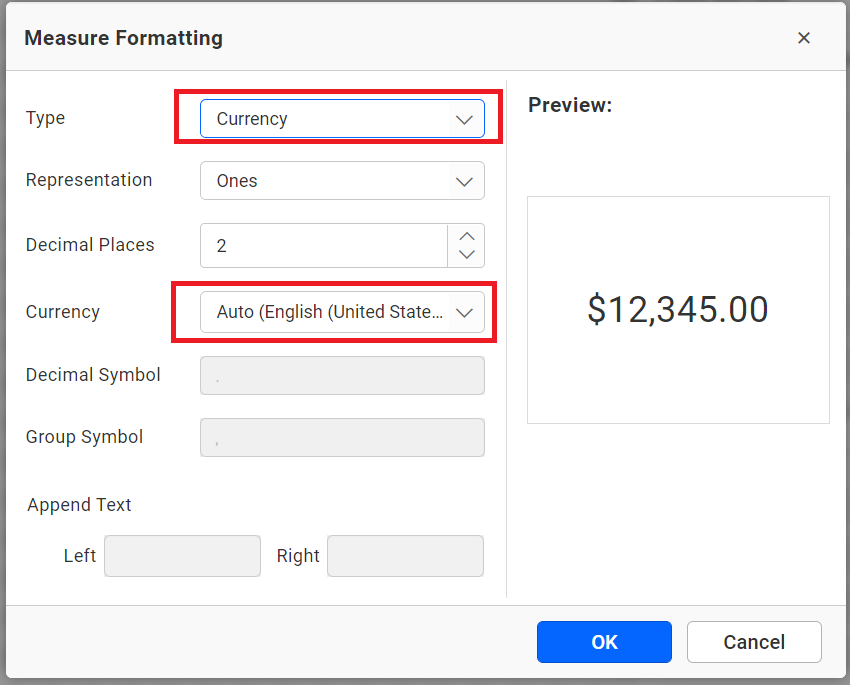
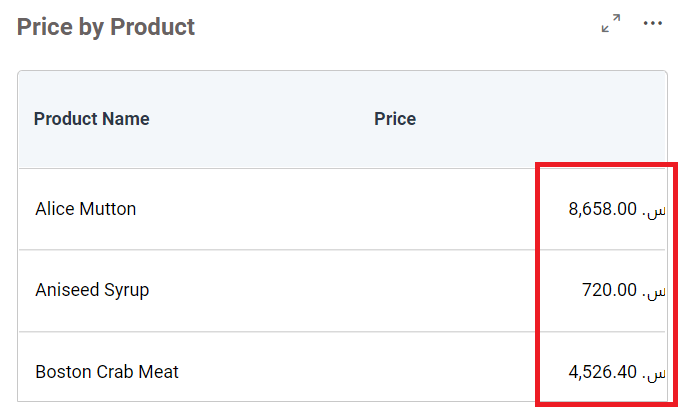
Holds the value to change the dashboard’s culture, affecting formats like currency.
- Default:
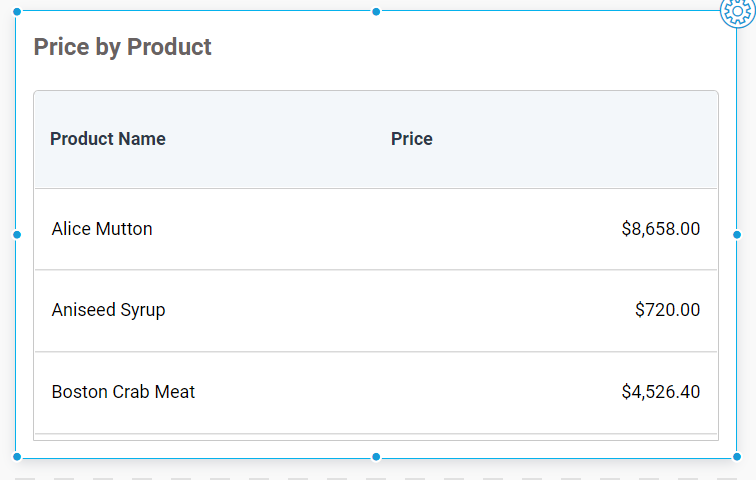
en-US - Note: You can set the culture for the current user via the API in embedding. For example, configuring a widget to display currency defaults to
Auto (English(en-US)). After setting a custom culture, the widget reflects the new format.
Example
var dashboard = BoldBI.create({
    mode: BoldBI.Mode.Design,
    settings: {
        locale: {
          culture: "en-US"
        }
    }
});
dashboard.loadDesigner();
Additional Info:
- Default currency culture:
- Default grid view:
- Modified culture:
- Refer to Embedding In Your Application for setup steps. Use the
cultureSettingsAPI to adjust the culture post-embedding.
viewData
allColumns
boolean
Specifies whether to show or hide the display of all columns in the table in the View Underlying Data of the widget.
- Default:
false
Example
var dashboard = BoldBI.create({
    mode: BoldBI.Mode.Design,
    settings: {
        viewData: {
            allColumns: true // Column options are all checked in the dashboard viewer and designer preview..
        }
     }
});
dashboard.loadDesigner();
columnSelection
boolean
Specifies whether to show or hide the “Select Column” button in the view underlying data of the widget.
- Default:
true
Example
var dashboard = BoldBI.create({
    mode: BoldBI.Mode.Design,
    settings: {
        viewData: {
            columnSelection: false // Select column button will be hidden in the dashboard viewer and designer preview.
        }
    }
});
dashboard.loadDesigner();
exporting
boolean
Specifies whether to show or hide the export option in the view underlying data of the widget.
- Default:
true
Example
var dashboard = BoldBI.create({
    mode: BoldBI.Mode.Design,
    settings: {
        viewData: {
            exporting: false // The Export option will be hidden in the dashboard viewer and designer preview.
        }
     }
});
dashboard.loadDesigner();
viewer
dashboardName
Specifies whether or not to update the Dashboards name in the header section for a Single Tab Dashboard.
- Default:
- Single Tab Dashboard:
""(empty)
- Single Tab Dashboard:
- Note: For Multi Tab Dashboard, these is no designer support.
Example (Single Tab Dashboard)
var dashboard = BoldBI.create({
    mode: BoldBI.Mode.Design,
    settings: {
        viewer: {
            dashboardName: "name"
        }
    }
});
dashboard.loadDesigner();
edit
boolean
Specifies whether to show or hide the Edit icon in dashboard banner.
Note: Edit icon will be show by default in dashboard viewer banner if the user has the designer permisson.
- Default:
true
Example
var dashboard = BoldBI.create({
    mode: BoldBI.Mode.Design,
    settings: {
        viewer: {
            edit: false
        }
    }
});
dashboard.loadDesigner();
viewer.widgetContainer
boxShadow
string
Customize the box shadow of the widgets.
- Default:
""(empty)
Example
var dashboard = BoldBI.create({
    mode: BoldBI.Mode.Design,
    settings: {
        viewer: {
            widgetContainer: {
                boxShadow: "10px 10px lightblue"
            }
        }
    }
});
dashboard.loadDesigner();
widgetContainer.margin
integer
Customize the margins of the widget with the corresponding integer values.
- Default:
null - Note: Do not specify the
pxsuffix; only integer values are supported.
Example
var dashboard = BoldBI.create({
    mode: BoldBI.Mode.Design,
    settings: {
        viewer: {
            widgetContainer: {
                margin: 20
            }
        }
    }
});
dashboard.loadDesigner();
designer
hideSettings
boolean
Specifies whether to display or hide the Settings icons in widgets and the designer panel.
- Default:
false
Example
var dashboard = BoldBI.create({
    mode: BoldBI.Mode.Design,
    settings: {
        designer: {
            hideSettings: true // By default, the settings icon will be shown.
        }
    }
});
dashboard.loadDesigner();
previewAs
boolean
Specifies whether to display or hide the Preview as option in the designer preview.
- Default:
true
Example
var dashboard = BoldBI.create({
    mode: BoldBI.Mode.Design,
    settings: {
        designer: {
            previewAs: true // By default, the previewAs button will be shown.
        }
    }
});
dashboard.loadDesigner();
dataSourceConfig
hideDataSourceConfig
boolean
Specifies whether to show or hide the Data source configuration button in the dashboard designer.
- Default:
false
Example
var dashboard = BoldBI.create({
    mode: BoldBI.Mode.Design,
    settings: {
        designer: {
            dataSourceConfig: {
                hideDataSourceConfig: false // By default, the datasource configuration is shown.
            }
        }
    }
});
dashboard.loadDesigner();
hideDataSourceList
boolean
Specify whether to show or hide the Data source List dropdown configuration in the dashboard designer.
- Default:
false
Example
var dashboard = BoldBI.create({
    mode: BoldBI.Mode.Design,
    settings: {
        designer: {
            dataSourceConfig: {
                hideDataSourceList: false // By default, the datasource list dropdown is shown.
           }
        }
     }
});
dashboard.loadDesigner();
hideExpression
boolean
Specify whether to show or hide the Hide Expression configuration button in the dashboard designer.
- Default:
false
Example
var dashboard = BoldBI.create({
    mode: BoldBI.Mode.Design,
    settings: {
        designer: {
            dataSourceConfig: {
                hideExpression: false // By default, the add expression button is shown.
            }
        }
    }
});
dashboard.loadDesigner();
hideSampleDataSources
boolean
Specifies whether to show or hide the Sample Datasources option under the datasource configuration in the dashboard designer.
- Default:
false
Example
var dashboard = BoldBI.create({
    mode: BoldBI.Mode.Design,
    settings: {
        designer: {
            dataSourceConfig: {
                hideSampleDataSources: false // By default, the sample datasource option is shown.
            }
        }
    }
});
dashboard.loadDesigner();
preConfiguredWidgets
Predefined or preconfigured widgets are a list of widgets that appear under the Default Widget Panel when initializing the dashboard designer. To achieve this, create a template dashboard and configure the widgets to be considered as predefined widgets for your designer.
categoryName
string
Specifies the value to set the category name where the widget will be added in the designer.
- Default:
""(empty) - Note:
- If
categoryNameexists, predefined widgets are added to that category. - If
categoryNamedoes not exist, a new category with the given name is created. - Otherwise, widgets are added to the
Miscellaneouscategory by default.
- If
Example
var dashboard = BoldBI.create({
    mode: BoldBI.Mode.Design,
    settings: {
        designer: {
            preConfiguredWidgets: {
                categoryName: ""
            }
        }
    }
});
dashboard.loadDesigner();
preConfiguredWidgets.dashboardId
string
Specifies the value to set the dashboard ID from which preconfigured widgets will be listed in the embedded dashboard designer.
- Default:
""(empty)
Example
var dashboard = BoldBI.create({
    mode: BoldBI.Mode.Design,
    settings: {
        designer: {
            preConfiguredWidgets: {
                dashboardId: ""
            }
        }
    }
});
dashboard.loadDesigner();
widgetsPanel
enableModernLayout
boolean
Enables the modern widget panel experience in the dashboard designer, including enhanced layouts, improved styling, and modern widget browsing capabilities. This introduces a Modern panel alongside the existing panel and enhances the UI to clearly differentiate between Classic and Modern widgets.
- Default:
true - Note: This feature is available from Bold BI version 16.1 onwards. When
enableModernLayoutis set totrue, Classic and Modern widgets are organized into separate tabs, each displaying their respective widget groups. WhenenableModernLayoutis set tofalse, both Classic and Modern widgets are displayed together in a single view without tab separation. In this mode, thedisplayModeproperty is not applicable.
Example
var dashboard = BoldBI.create({
    mode: BoldBI.Mode.Design,
    settings: {
        designer: {
            widgetsPanel: {
                enableModernLayout: true
            }
        }
    }
});
dashboard.loadDesigner();
displayMode
enum
Controls which widget categories are displayed in the widget panel.
- Supported Values:
BoldBI.WidgetPanelDisplayMode.Classic: Displays Classic widgets.BoldBI.WidgetPanelDisplayMode.Modern: Displays Modern widgets.BoldBI.WidgetPanelDisplayMode.Both: Displays both Classic and Modern categories and allows users to switch between them.
- Default:
BoldBI.WidgetPanelDisplayMode.Both - Note: This feature is available from Bold BI version 16.1 onwards. This property works only when
enableModernLayoutis set totrue.
Example
var dashboard = BoldBI.create({
    mode: BoldBI.Mode.Design,
    settings: {
        designer: {
            widgetsPanel: {
                enableModernLayout: true,
                displayMode: BoldBI.WidgetPanelDisplayMode.Both
            }
        }
    }
});
dashboard.loadDesigner();
existingDashboards
Array
The dashboard widgets can be added to the existing panel tab.
- Default:
[](empty array)
Example
var dashboard = BoldBI.create({
    mode: BoldBI.Mode.Design,
    settings: {
        designer: {
            widgetsPanel: {
                existingDashboards: [] //Here you are able to pass the n number of dashboard ids.
            }
        }
    }
});
dashboard.loadDesigner();
hideDefaultWidgets
boolean
Please indicate whether to display or hide the Default Widgets panel tab in the dashboard designer.
- Default:
false
Example
var dashboard = BoldBI.create({
    mode: BoldBI.Mode.Design,
    settings: {
        designer: {
            widgetsPanel: {
                hideDefaultWidgets: false // By default, the Default Widgets will be shown.
            }
        }
    }
});
dashboard.loadDesigner();
hideExistingWidgets
boolean
Specifies whether to show or hide the Existing Widgets panel tab on the dashboard designer.
- Default:
false
Example
var dashboard = BoldBI.create({
    mode: BoldBI.Mode.Design,
    settings: {
        designer: {
            widgetsPanel: {
                hideExistingWidgets: false // By default, the Existing Widgets will be shown.
            }
        }
    }
});
dashboard.loadDesigner();